The night shift, on autopilot.
A customer asks kitna baki hai at 9 pm. takkada.ai replies from your Tally books with the balance and the statement, notes his payment promise, and posts the money when it lands. You read the whole night at 7 am.
9:15 pmQuoted ₹42,350 to Rajesh Traders Settled
Incubated by
- Government of OdishaStartup Odisha
- GFTNGlobal Finance & Technology Network


The second shift
The shop closes at 8. The phone does not.
After the shutter comes down, the second shift starts. "Bhai kitna baki hai." "Statement bhej do." "Kal pakka." Balance requests to answer, payments to chase, promises to remember. Most owners give that work two hours every evening, unpaid.
The books already know every answer. You are the one typing it into WhatsApp, one party at a time. That job, the whole night shift of it, is the job takkada.ai takes.
The night staff
Three night jobs, off your plate
Balance clerkon duty 9:14 pm
Balance requests answer themselves
When a party asks kitna baki hai or statement bhej do, takkada.ai replies with the live balance from your Tally books and attaches the statement PDF. The party gets his answer in a minute instead of waiting for you to reach the counter.
Collections clerkon duty 10:15 pm
Payment reminders go out on schedule
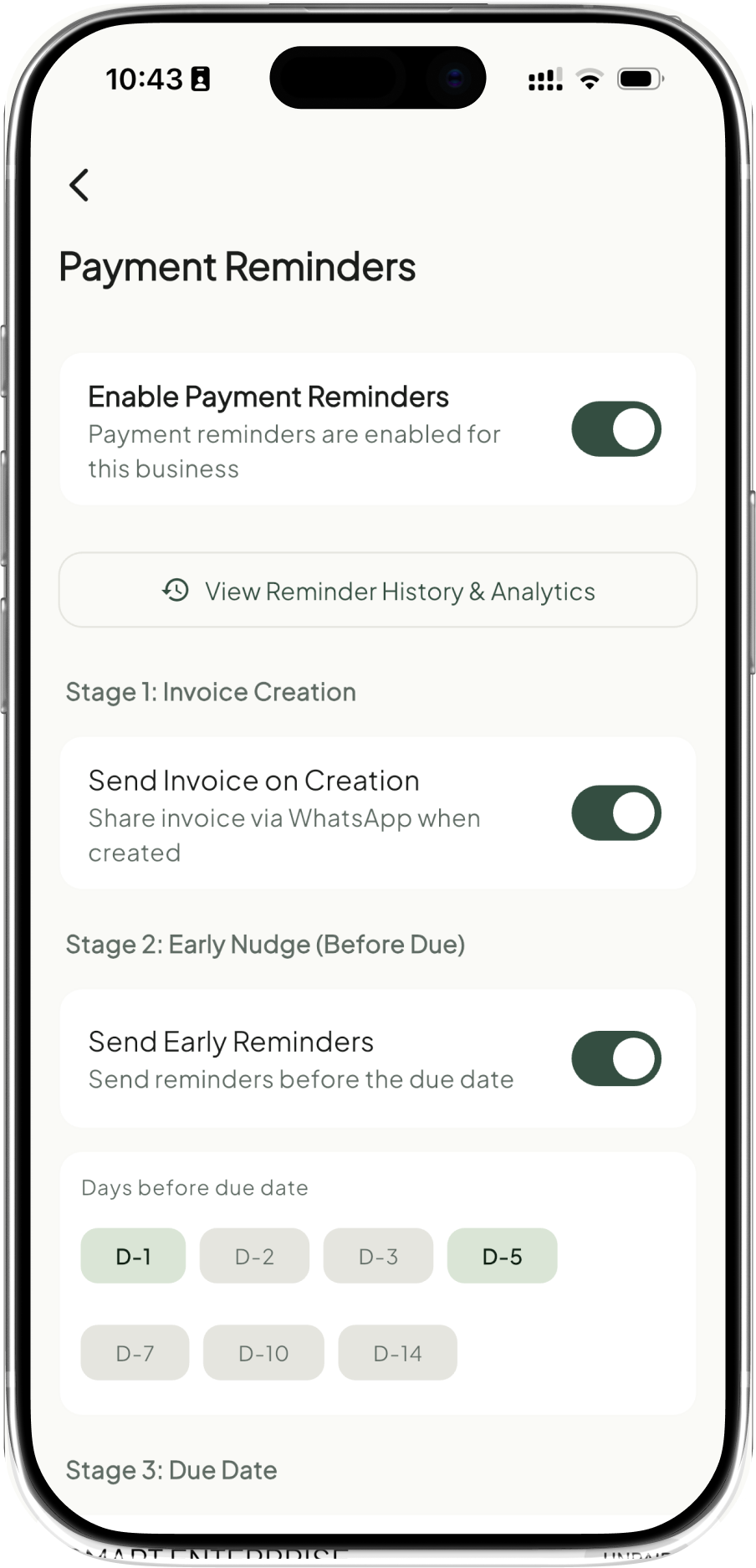
Parties with dues get a polite reminder on WhatsApp, then a follow-up if it goes quiet. When a payment lands, the reminders stop on their own. You set the tone and the schedule once, and the autopilot keeps it running.
Bookkeeperon duty 6:38 am
Payments land back in your books
When the customer pays, takkada matches the receipt against the invoice and your ledger updates. Every rupee that came in overnight is posted before you open the shop.
- 6:38 amReceived ₹18,500 from Borah Stores
- 6:38 amMatched against invoice 142
- 6:39 amPosted to your books
The morning report
One message tells you the whole night.
Every reply, reminder, and receipt is logged the moment it happens. At 7 am the report lands on your WhatsApp, in rupees, with every entry already in the books.
Morning report, 6 July.
₹18,500 received: Borah Stores, invoice 142, posted to the books.
3 balance requests answered, statements attached.
14 reminders sent. 1 promise noted: Rajesh Traders, Friday.
Every entry is in the books. Nothing needed from you.
An illustration of a typical night on the v1 workflows.
- 9:14 pmAnswered Rajesh Traders: balance ₹42,350, statement sent
- 9:47 pmSent March to June statement to Maharani Traders
- 10:15 pmSent 14 payment reminders for dues falling this week
- 11:02 pmNoted a payment promise for Friday from Rajesh Traders
- 6:38 amRecorded ₹18,500 from Borah Stores against invoice 142
- 7:00 amMorning report sent, books already updated
The day shift
Orders become invoices, on their own
The night staff keeps day hours too. A customer sends the order on WhatsApp. takkada.ai reads it, raises the sales invoice in your books, generates the e-invoice and the e-way bill, and sends the bill back. No one at your counter typed a line.
The order comes in as a message
A party messages the order the way they always do. takkada.ai reads the items and the party, takes the rate from your books, and replies with the invoice attached. The order never waits for someone to open Tally.
The invoice, e-invoice and e-way bill raise themselves
The moment the order is confirmed, takkada.ai posts the sales invoice to your books, files the e-invoice for the IRN, and generates the e-way bill for the truck. The same autopilot handles the other documents the day produces. Delivery challans, sales orders, whatever the goods need to move.
- 2:40 pmRaised invoice 488 for Jain Kirana, ₹24,600
- 2:40 pme-invoice filed, IRN received
- 2:40 pme-way bill generated for the consignment
- 2:41 pmPosted to your Tally books
- 2:41 pmInvoice sent to Jain Kirana on WhatsApp
An illustration of the v1 order-to-invoice workflow.
Straight talk
The three doubts, answered straight
Every owner asks the same three questions before letting anything near his books. Fair questions. Plain answers.
What if the AI quotes a wrong balance?
Every reply is read from your Tally books at the moment it is sent. The balance it quotes is the balance your accountant sees, and every reply sits in your log with the entry it came from.
Where does my data go?
Each party is sent his own account and nothing else. Your books stay yours. We sell software, never data, and the morning report shows you everything that went out, line by line.
What if it spoils my books?
The autopilot starts read-only: it answers and reminds without writing anything. Posting begins only where you sanction it, entry by entry. It can never delete a voucher, change a rate, or pay anyone.
A fourth doubt is welcome. Ask it on WhatsApp and a founder answers it himself.
Ask on WhatsAppBuilt on takkada
Answers from your real books
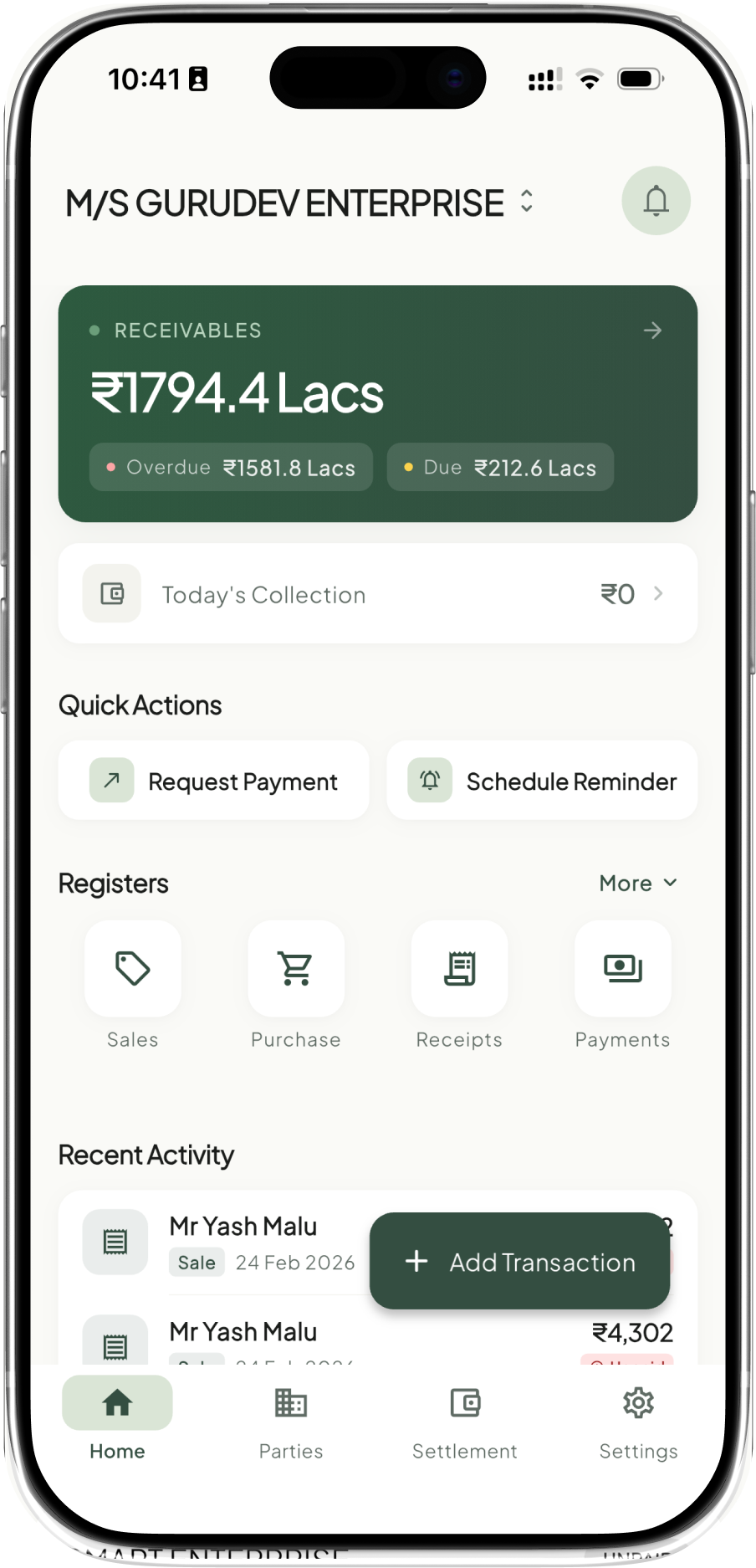
Every reply takkada.ai sends comes from your actual ledger. It runs on takkada, our Tally companion that keeps the desktop books and the phone in sync. Your Tally stays exactly where it is.
A WhatsApp tool cannot quote a balance it does not hold, and a books package cannot send it anywhere. takkada.ai holds both, the books and the channel, at one desk. That is why the balance it quotes is the balance in your books, and the receipt it records is the one your accountant sees.
- 100+
- Businesses
- ₹17Cr+
- Collected monthly
- 1000s
- Reminders sent
Getting started
It earns the pen, step by step
Connect your books
Install takkada and link your Tally. Already a takkada customer? This step is already done.
It starts read-only
Balance replies and payment reminders go on autopilot first. You approve the tone and the schedule, and it posts nothing.
It earns the pen
When you are ready, you sanction what it may write: receipts first, invoices when you say so. The morning report shows every move it makes.
Early access
Put tonight on autopilot.
takkada.ai is opening to a small set of businesses first, with takkada customers at the front of the line. Message us on WhatsApp: a founder replies within one working day, and setup is one 15-minute call.
Email works too: ronak@paysaathi.com
For the record
A note for the other reader
Most software for Indian businesses keeps score. The work it counts, answering parties, chasing payments, recording receipts, raising invoices, still happens by hand, on WhatsApp, after hours.
takkada.ai does that work from the books themselves. It runs on takkada, our live Tally companion, because an autopilot is only trustworthy when it holds the books it speaks for. The free-ledger decade proved owners will not pay to keep score twice. They pay when the work disappears.
The longer argument is a conversation: ronak@paysaathi.com.